
Know every sign you look after.
Pin every sign to the plan from your phone, with a photo and its exact location. One live record of the estate you manage, or of every client you work for.
Free trial with 2 staff logins and 3 maps. No card needed.
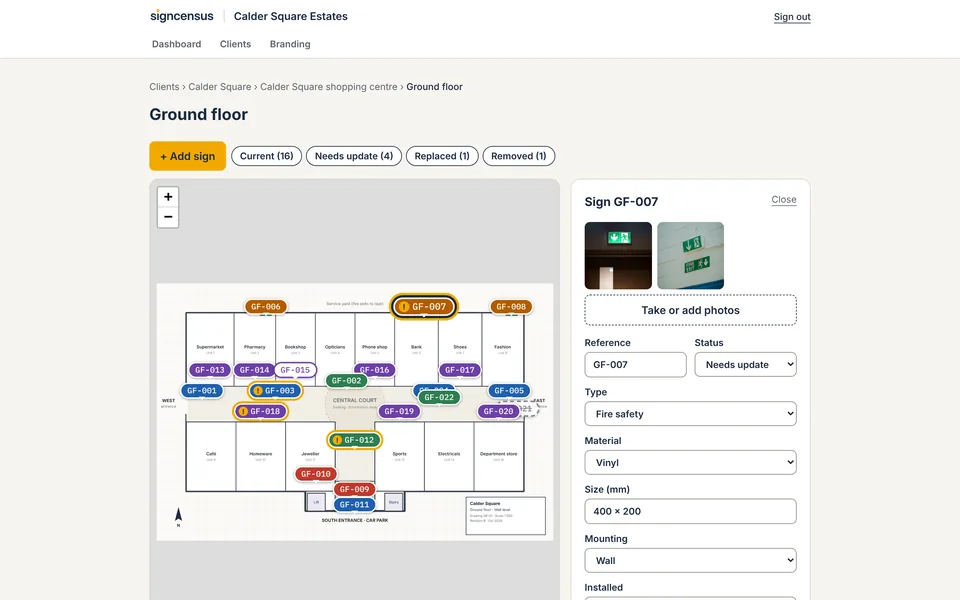
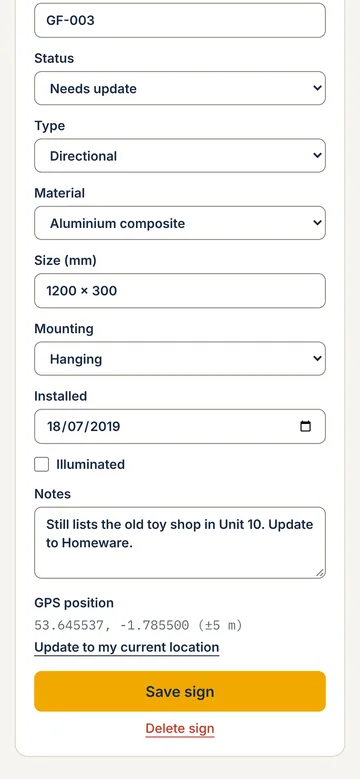
Your own estate, or your clients'.
Same plans, same pins, same record. Signcensus works whether the signs are yours or you look after them for someone else.

Looking after your own estate
Shopping centres, councils, retailers, NHS trusts, universities and housing associations keep one record of every sign across every building, floor and car park they manage.
- Know what you have, where it is and what condition it's in
- Plan budgets, rebrands and compliance checks from the record
- Give contractors a free read-only login to the sites they work on

Working for clients
Sign companies and facilities providers survey, quote, install and maintain signs for many clients, and keep each client's record separate.
- Survey in a morning and quote from the schedule, not from memory
- Send reports with your own logo and colour
- Give each client a free login to their own sites only
Every sign: on the plan, in a photo, on the map.
Stand at the sign with your phone and record the three things anyone will ask about it later.
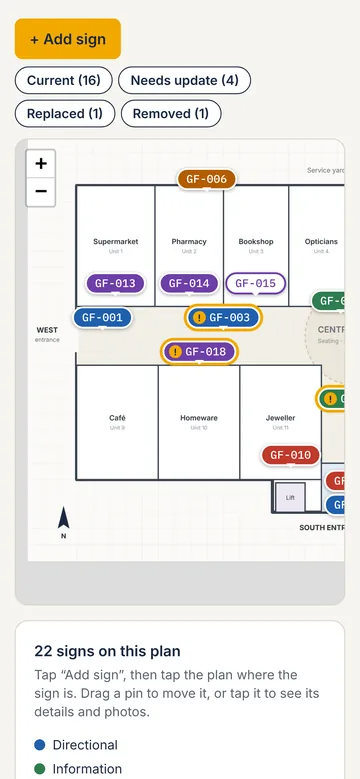
1Where it is on the plan
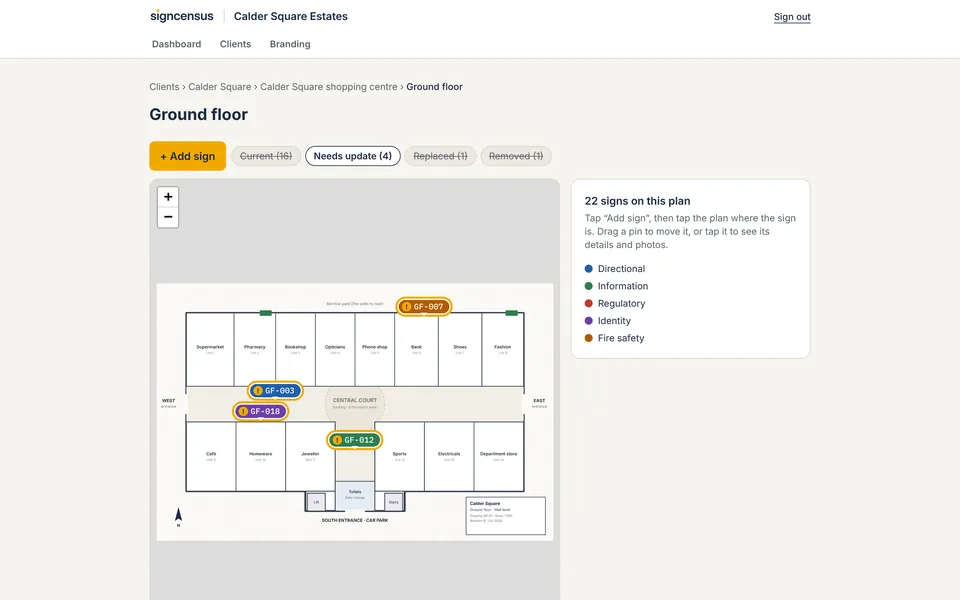
Tap the floor plan to drop a numbered pin. Colours show the sign type, and a warning shows anything that needs work.
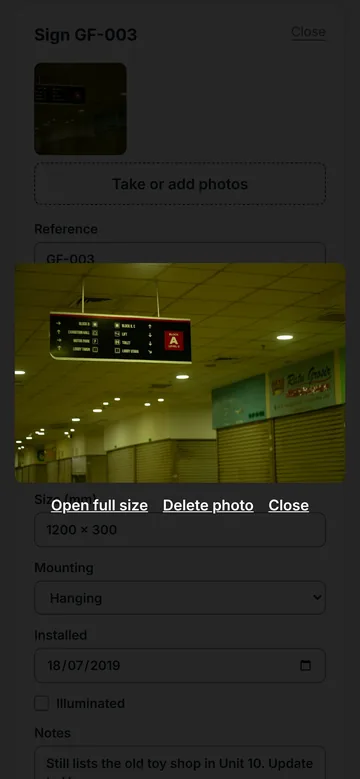
2What it looks like
Take photos with the phone camera and they attach straight to the sign, with its type, status, size and material.
3Where it is in the world
Record the phone's GPS position, so outdoor signs and large sites are easy to find again.
The sign schedule lives in six places.
A spreadsheet from the last job, a camera roll of 400 photos called IMG_4031, a marked-up PDF from 2019 and whatever the fitter remembers.

Surveys take daysWalk the site, photograph everything, then spend another day matching photos to a plan and typing it up.
Simple questions need a site visitHow many signs change in the rebrand? Which fire exit signs were checked? Nobody can say without walking the site again.
Records go staleSigns get damaged, moved and replaced. Six months later the schedule doesn't match what's on the wall.
Walk the site, tap each sign, done.
No app to install. It runs in the browser on any phone, and the plan is ready on your laptop when you get back to the office.
Upload the plan
Add a floor plan, site plan or aerial photo as an image. Each sign can also store the phone's GPS position.
Pin and photograph
Tap the plan where the sign is, take a photo and fill in the details: type, size, material, condition. Photos are named for you.
Filter and quote
Filter the whole site by status to see what needs replacing, repairing or removing, and quote from the record instead of from memory.
See what needs doing, across the whole site.
Everything recorded on site is already there. Filter by status to show only the signs that need updating, have been replaced or were removed, then plan the work from the record.
- Colour-coded sign types and a status for every sign
- Every change logged with who made it and when
- Export the schedule whenever you need it
Everything the job needs. Nothing it doesn't.
Pin every sign to the plan
Upload a floor plan, site plan or aerial image, then tap to drop a numbered pin where each sign is. Drag to adjust.
Photos from the phone camera
Take photos on site and they attach straight to the sign. No camera roll to sort through later.
Sign types, status and custom fields
A colour-coded legend for sign types, a status for every sign, notes, and the extra details your quotes need.
Filter by status
Show only the signs that are damaged, need updating or have been replaced, across a whole site.
GPS position for each sign
Record the phone's GPS position against a sign, so outdoor signs and large sites are easy to find again.
A record you can trust
Every change is logged with who made it and when. Data is hosted in London and handled under UK GDPR.
Export the sign schedule
Download the schedule as a spreadsheet, or a PDF report with photos, for budgets, quotes, ordering and installation.
Free read-only logins
Share the record with colleagues, contractors or clients at no extra cost. They only see the sites you share with them.
Your brand on reports
Your logo and colour on shared maps and PDF reports, and your own web address on the Agency plan.
A record you can hand to anyone.
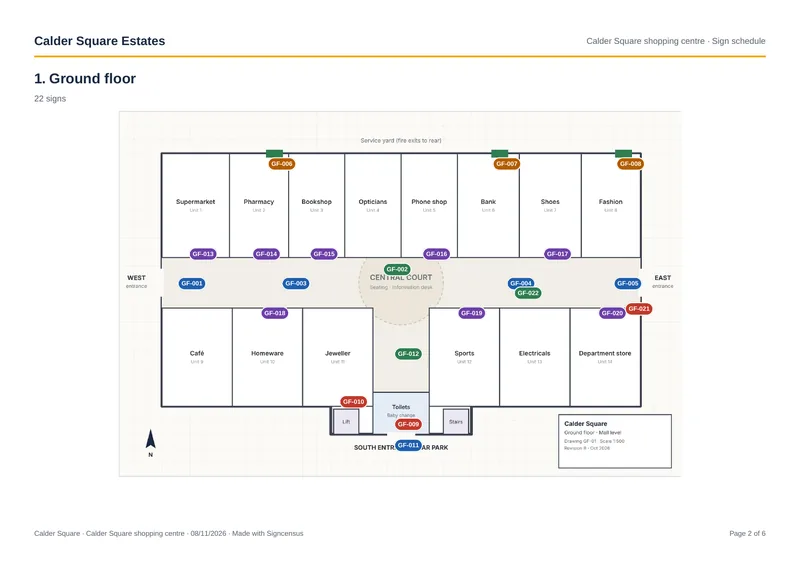
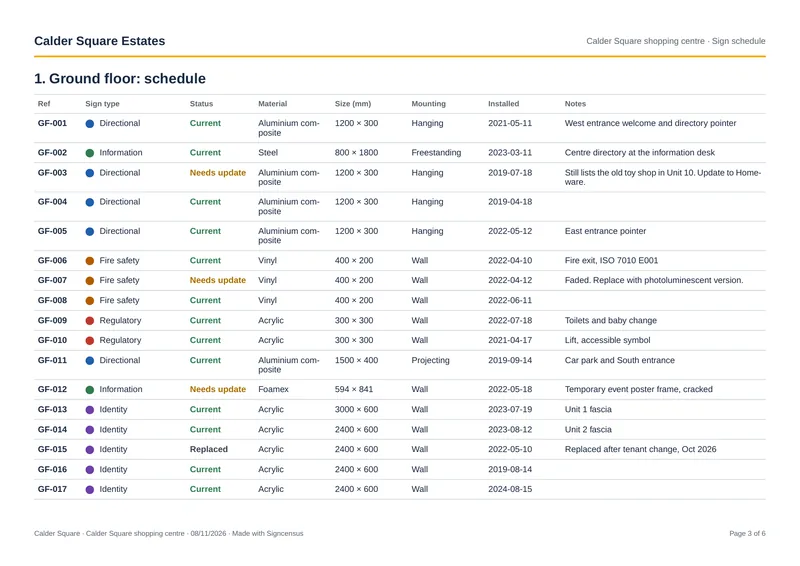
Download a PDF report with the plan, every pin and the full schedule, or a spreadsheet for budgets and quotes. Share the live record with colleagues, contractors or clients through free read-only logins.
- A PDF report and a spreadsheet for every site
- Your logo and colour on reports and shared maps
- For sign companies on Agency: your own web address and no “powered by”
One flat price per company.
Read-only logins are free, and there's no contract.
Starter
£49 /month
For one person looking after a single estate, or a sole trader.
- 1 staff login
- Up to 5 maps
- Unlimited sites, signs and photos
- Sign types, status and custom fields
- Spreadsheet export
Pro
£149 /month
For estate teams and sign companies with several sites.
- 5 staff logins
- Up to 50 maps
- Everything in Starter
- Free read-only logins for clients or colleagues
- Your logo and colour on shared maps and reports
Agency
from £399 /month
For large estates and sign firms who want it under their own brand.
- Unlimited staff and maps
- Everything in Pro
- Priority support
- Your own web address
- No “powered by”
Prices are per company, in pounds sterling, excluding VAT. Monthly, no contract. Free trial with 2 staff logins and 3 maps. No card needed.
Good questions, plain answers.
What is Signcensus?
Signcensus is signage survey and audit software. You upload a site plan, walk the site with your phone, and pin every sign to the plan with photos, a sign type, a status and the details you need. It gives estate teams and sign companies one up-to-date record of every sign they look after.
Who is it for?
Two kinds of team. Organisations that look after the signs across their own estate, such as shopping centres, councils, retailers, NHS trusts, universities and housing associations. And sign companies and facilities providers that survey, quote, install and maintain signs for their clients.
We look after our own buildings. Does it still work for us?
Yes. When you sign up, choose "Our own signs" and there are no clients to set up: you go straight to your sites, plans and signs. Sign companies choose "Our clients' signs" and keep each client separate. You can change it later in your account settings.
Do I need to install an app?
No. It runs in the web browser on any modern phone, tablet or computer, and uses the phone's camera and GPS on site. You can add it to your home screen so it opens like an app.
What if a site has no floor plan?
Use any image as the plan: a photo of a fire plan, a sketch, a site layout or an aerial view. Each sign can also store the phone's GPS position.
How much does it cost?
One flat monthly price per company, excluding VAT: Starter £49, Pro £149 and Agency from £399. Read-only logins are free, there's no contract, and you can start with a free trial.
Who owns the data?
You do. Your signs, details and photos belong to your company, and you take them with you if you leave.
Where is the data stored?
The database is hosted in London and handled under UK GDPR. Every change is logged with who made it and when.
Survey your next site with Signcensus.
Upload a plan, walk the site and pin every sign from your phone. Free trial, no card needed.